> ## Documentation Index
> Fetch the complete documentation index at: https://methodscenter.mintlify.site/llms.txt
> Use this file to discover all available pages before exploring further.
# Lecturer View
## Lecturer Features & Use Cases
### 1. Account Management
#### Create Lecturer Account
* Register with university email
* Assigned as Lecturer by admin
* Associate with university
* Receive lecturer permissions
***
### 2. Module Management
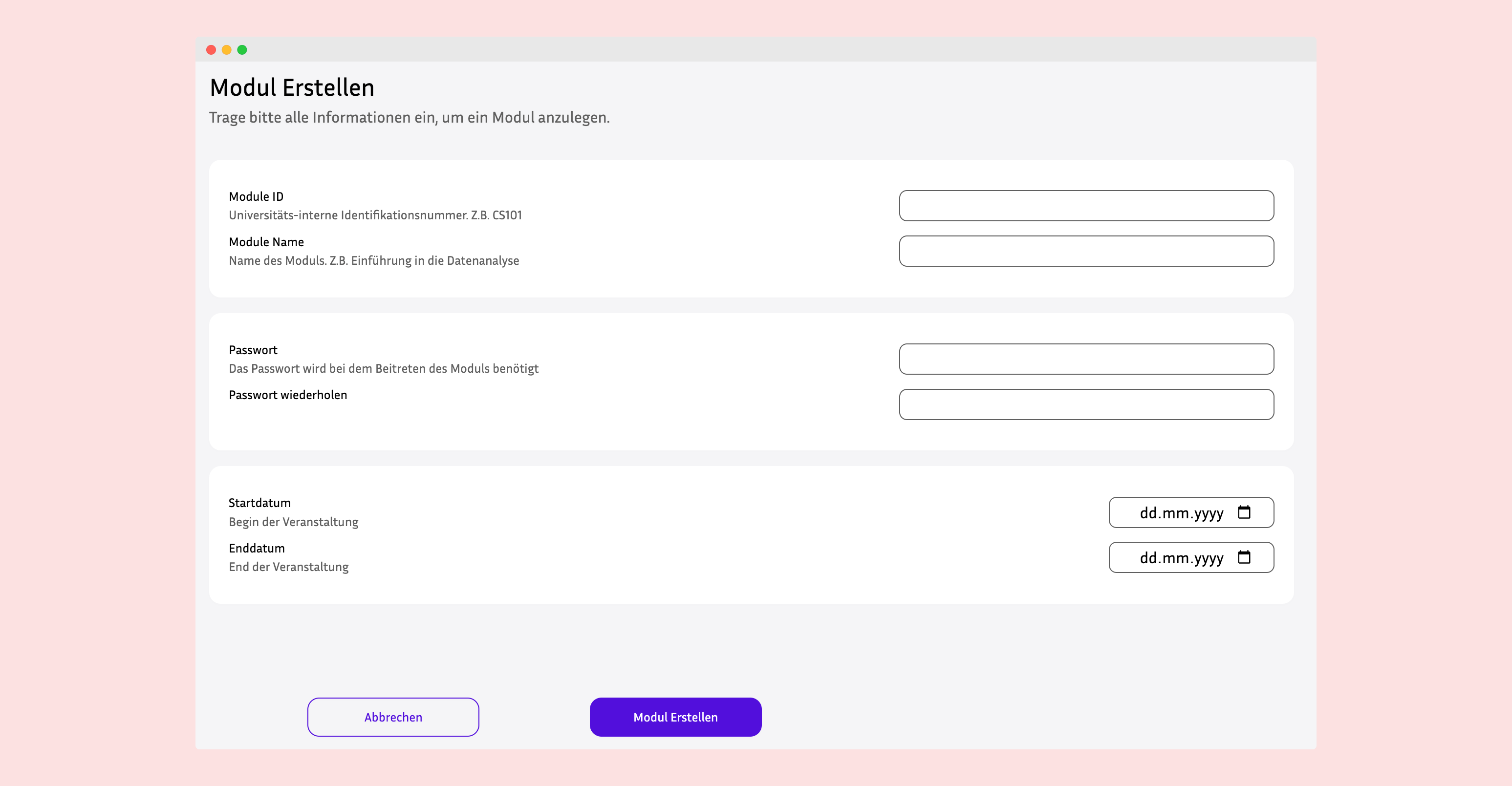
#### Create New Module
* Define module details:
* Module name (e.g., "Mathematics I")
* Module code (e.g., "MATH101")
* Semester (Winter/Summer)
* Start and end dates
* Survey days (select days of week: Monday, Wednesday, etc.)
* Module password for student enrollment
* Set module status (Active/Inactive)
* Assign to university
 #### Configure Module Settings
* Set survey schedule days (e.g., Mondays and Thursdays)
* Define semester period
* Create secure enrollment password
* Update module status
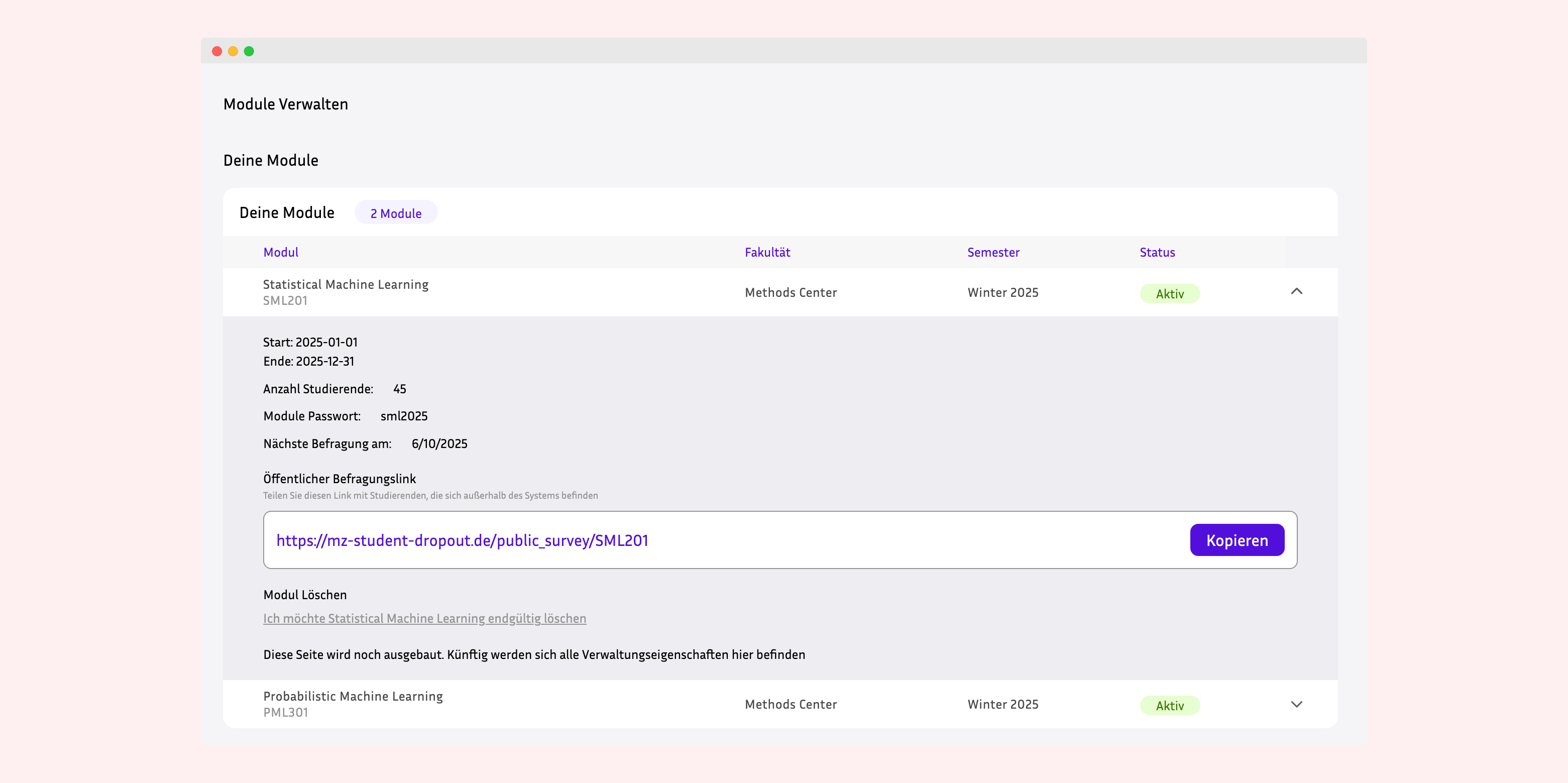
#### Manage Module Access
* Share module password with enrolled students
* Control module activation/deactivation
* Update module information
* Archive completed modules
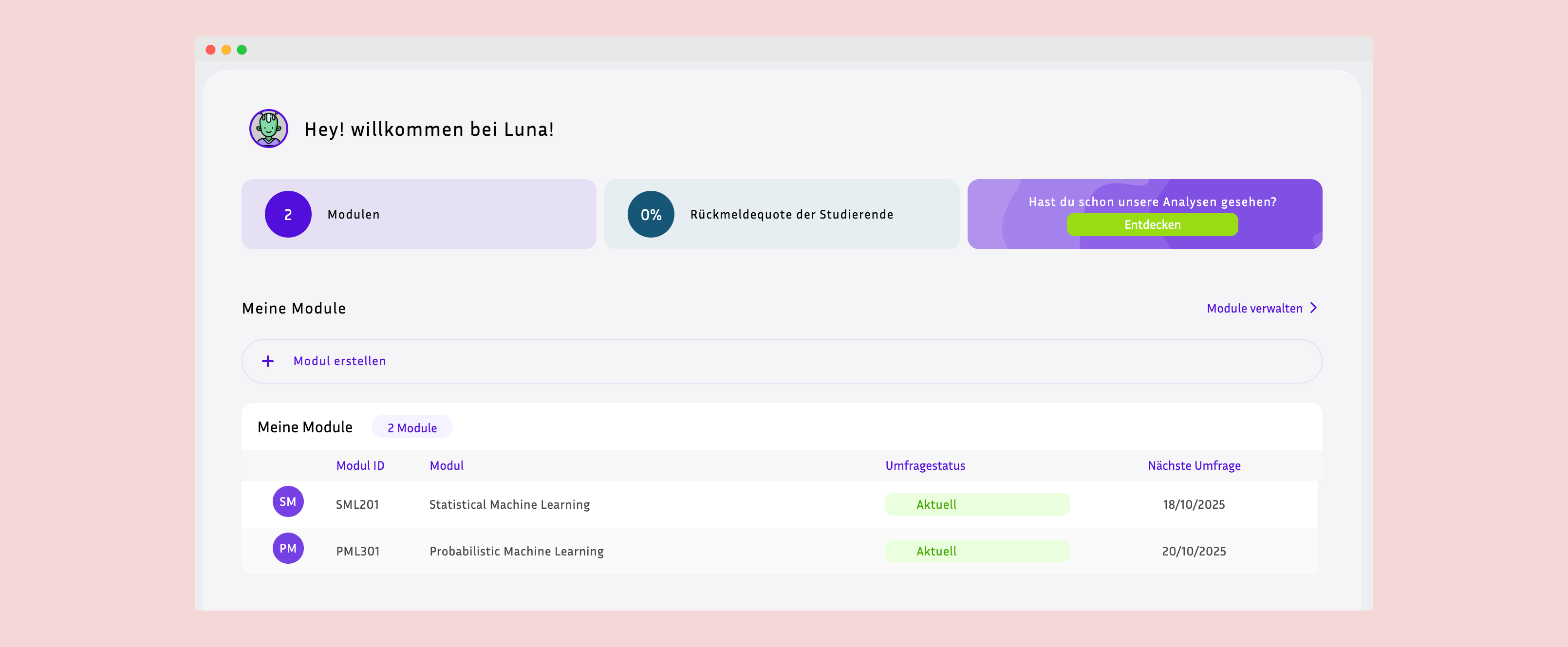
#### View Module Statistics
* See total enrolled students
* Monitor enrollment trends
* Track student participation
* View module activity
#### Configure Module Settings
* Set survey schedule days (e.g., Mondays and Thursdays)
* Define semester period
* Create secure enrollment password
* Update module status
#### Manage Module Access
* Share module password with enrolled students
* Control module activation/deactivation
* Update module information
* Archive completed modules
#### View Module Statistics
* See total enrolled students
* Monitor enrollment trends
* Track student participation
* View module activity
 ***
### 3. Survey & Form Management
#### Create Survey Forms
* Design custom forms using JSON structure
* Define question types and formats
* Set form metadata (name, description)
* Configure form deployment settings
***
### 3. Survey & Form Management
#### Create Survey Forms
* Design custom forms using JSON structure
* Define question types and formats
* Set form metadata (name, description)
* Configure form deployment settings
 #### Deploy Surveys
* Surveys auto-deploy on configured survey days
* System automatically creates StudentSurvey instances
* All enrolled students receive surveys simultaneously
* Cron job handles scheduled deployment
#### Monitor Survey Responses
* View survey completion rates
* Track submission timestamps
* See individual student responses
* Monitor resolution status (Completed/Not Completed)
#### Manage Survey Content
* Update survey questions
* Modify form structure (JSON)
* Create multiple survey versions
* Archive old surveys
***
### 4. Student Management
#### View Enrolled Students
* Access list of all students in module
* See student profile information:
* Name and email
* Student ID
* Enrollment date
* Demographic data (if permitted)
#### Track Student Participation
* Monitor survey completion per student
* View participation rates
* Identify at-risk students (low participation)
* Track longitudinal engagement
#### Manage Enrollments
* Approve/reject enrollments (if manual approval enabled)
* Remove students from module
* View enrollment history
* Export student lists
***
### 5. Data Collection & Analysis
#### Access Survey Data
* View all survey responses for module
* Export data in various formats
* Access raw JSON response data
* Download datasets for analysis
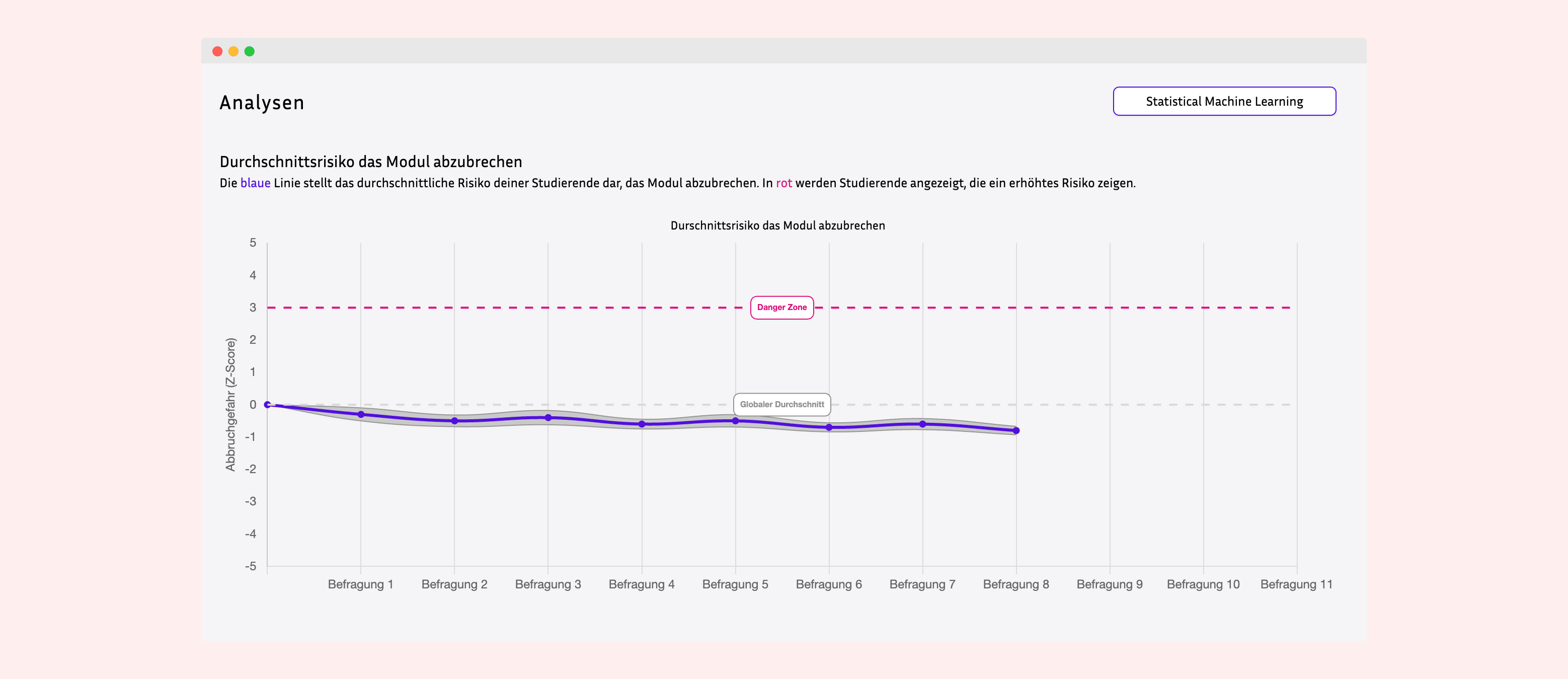
#### Generate Reports
* Survey completion statistics
* Student participation metrics
* Time-series response data
* Module performance indicators
#### Deploy Surveys
* Surveys auto-deploy on configured survey days
* System automatically creates StudentSurvey instances
* All enrolled students receive surveys simultaneously
* Cron job handles scheduled deployment
#### Monitor Survey Responses
* View survey completion rates
* Track submission timestamps
* See individual student responses
* Monitor resolution status (Completed/Not Completed)
#### Manage Survey Content
* Update survey questions
* Modify form structure (JSON)
* Create multiple survey versions
* Archive old surveys
***
### 4. Student Management
#### View Enrolled Students
* Access list of all students in module
* See student profile information:
* Name and email
* Student ID
* Enrollment date
* Demographic data (if permitted)
#### Track Student Participation
* Monitor survey completion per student
* View participation rates
* Identify at-risk students (low participation)
* Track longitudinal engagement
#### Manage Enrollments
* Approve/reject enrollments (if manual approval enabled)
* Remove students from module
* View enrollment history
* Export student lists
***
### 5. Data Collection & Analysis
#### Access Survey Data
* View all survey responses for module
* Export data in various formats
* Access raw JSON response data
* Download datasets for analysis
#### Generate Reports
* Survey completion statistics
* Student participation metrics
* Time-series response data
* Module performance indicators
 #### Export Data for Research
* Extract structured datasets
* Export to CSV, JSON formats
* Prepare data for statistical analysis
* Support psychometric modeling
***
### 6. Administrative Functions
#### Module Lifecycle Management
* Create module at semester start
* Activate for student enrollment
* Monitor throughout semester
* Deactivate at semester end
* Archive for historical records
#### System Configuration
* Configure survey automation settings
* Manage cron job schedules
* Set notification preferences
* Update module parameters
***
## Lecturer User Workflows
### Typical Semester Setup Workflow
```
1. Create New Module
↓
2. Configure Module Settings
- Set dates (start/end)
- Select survey days
- Create enrollment password
↓
3. Design Survey Forms
- Create JSON form structure
- Define questions
↓
4. Activate Module (Status: ACTIVE)
↓
5. Share Password with Students
↓
6. Students Enroll
↓
7. Monitor Enrollments
↓
8. Cron Job Deploys Surveys Automatically
↓
9. Track Student Participation
↓
10. Collect & Analyze Data
↓
11. End Semester - Deactivate Module
```
### Weekly Monitoring Routine
```
Survey Day (e.g., Monday)
↓
Cron Job Creates StudentSurvey Instances
↓
Lecturer Logs into Admin Panel
↓
Navigate to Module Dashboard
↓
Check Survey Deployment Status
↓
Monitor Student Completion Rates
↓
Identify Non-Responders
↓
Send Reminders (if needed)
↓
Review Submitted Responses
↓
Export Data for Analysis
```
***
## Lecturer Capabilities Summary
### What Lecturers Can Do:
✅ **Module Management**
* Create and configure modules
* Set survey schedules
* Manage module lifecycle
* Control access with passwords
✅ **Survey Administration**
* Design custom forms (JSON)
* Deploy surveys automatically
* Monitor response rates
* Track completion status
✅ **Student Oversight**
* View enrolled students
* Track participation metrics
* Identify non-responders
* Monitor engagement trends
✅ **Data Management**
* Access survey responses
* Export datasets
* Generate reports
* Prepare research data
✅ **Admin Access**
* Use Django admin panel
* Configure system settings
* Manage users (limited)
* View analytics
✅ **Research Functions**
* Collect longitudinal data
* Export for statistical analysis
* Support psychometric modeling
* Generate insights
***
## Lecturer Interface Components
### Key Admin Panel Sections:
1. **Dashboard** - Overview of owned modules
2. **Modules Management** - CRUD operations for modules
3. **Forms/Surveys** - Create and manage survey instruments
4. **StudentSurvey** - View and export response data
5. **StudentModule** - Monitor enrollments
6. **Users** - View student profiles (limited)
7. **Reports** - Analytics and statistics
### Module Detail View Components:
* **Module Information** - Name, code, dates, status
* **Enrolled Students** - List with participation stats
* **Survey Schedule** - Configured survey days
* **Response Tracking** - Completion rates and trends
* **Data Export** - Download options
***
## Automated Features for Lecturers
### Survey Auto-Deployment
* **Cron Job**: Runs every 12 hours
* **Logic**: Checks current day against module survey\_days
* **Action**: Creates StudentSurvey for enrolled students
* **Benefit**: No manual survey distribution needed
### Enrollment Management
* **Student Self-Enrollment**: Password-based system
* **Automatic Profile Creation**: StudentUser auto-created
* **Validation**: Unique student-module constraint
* **Benefit**: Reduced administrative overhead
### Data Integrity
* **Survey Numbering**: Auto-incremented per student-module
* **Timestamp Tracking**: Automatic creation and submission times
* **Status Management**: Resolution auto-updated on submission
* **Benefit**: Clean, structured datasets
***
## Best Practices for Lecturers
### Module Setup
1. Create module at least 1 week before semester start
2. Test survey deployment with sample students
3. Communicate password clearly to students
4. Set realistic survey days (not too frequent)
### Survey Design
1. Keep surveys concise (10-15 minutes max)
2. Use consistent question formats
3. Test JSON structure before deployment
4. Include clear instructions in form
### Data Collection
1. Monitor participation weekly
2. Send reminders for low responders
3. Export data regularly for backup
4. Document survey versions for reproducibility
### Student Communication
1. Explain research purpose clearly
2. Emphasize data privacy
3. Provide technical support
4. Acknowledge participation importance
***
## Benefits for Lecturers
### Research Benefits
* **Automated Data Collection** - Scheduled survey deployment
* **Longitudinal Datasets** - Time-series student data
* **Flexible Survey Design** - JSON-based customization
* **Export Capabilities** - Multiple data formats
### Administrative Benefits
* **Self-Service Enrollment** - Password-based system
* **Automated Tracking** - Participation monitoring
* **Centralized Management** - Single admin interface
* **Scalability** - Support multiple modules/cohorts
### Educational Benefits
* **Student Insights** - Understanding affective states
* **Early Warning** - Identify at-risk students
* **Intervention Support** - Data-driven decisions
* **Course Improvement** - Evidence-based refinements
***
For technical details, see [Architecture Guide](./architecture.md)
For installation, see [Installation Guide](./installation.md)
For student features, see [Student Experience](./student-experience.md)
#### Export Data for Research
* Extract structured datasets
* Export to CSV, JSON formats
* Prepare data for statistical analysis
* Support psychometric modeling
***
### 6. Administrative Functions
#### Module Lifecycle Management
* Create module at semester start
* Activate for student enrollment
* Monitor throughout semester
* Deactivate at semester end
* Archive for historical records
#### System Configuration
* Configure survey automation settings
* Manage cron job schedules
* Set notification preferences
* Update module parameters
***
## Lecturer User Workflows
### Typical Semester Setup Workflow
```
1. Create New Module
↓
2. Configure Module Settings
- Set dates (start/end)
- Select survey days
- Create enrollment password
↓
3. Design Survey Forms
- Create JSON form structure
- Define questions
↓
4. Activate Module (Status: ACTIVE)
↓
5. Share Password with Students
↓
6. Students Enroll
↓
7. Monitor Enrollments
↓
8. Cron Job Deploys Surveys Automatically
↓
9. Track Student Participation
↓
10. Collect & Analyze Data
↓
11. End Semester - Deactivate Module
```
### Weekly Monitoring Routine
```
Survey Day (e.g., Monday)
↓
Cron Job Creates StudentSurvey Instances
↓
Lecturer Logs into Admin Panel
↓
Navigate to Module Dashboard
↓
Check Survey Deployment Status
↓
Monitor Student Completion Rates
↓
Identify Non-Responders
↓
Send Reminders (if needed)
↓
Review Submitted Responses
↓
Export Data for Analysis
```
***
## Lecturer Capabilities Summary
### What Lecturers Can Do:
✅ **Module Management**
* Create and configure modules
* Set survey schedules
* Manage module lifecycle
* Control access with passwords
✅ **Survey Administration**
* Design custom forms (JSON)
* Deploy surveys automatically
* Monitor response rates
* Track completion status
✅ **Student Oversight**
* View enrolled students
* Track participation metrics
* Identify non-responders
* Monitor engagement trends
✅ **Data Management**
* Access survey responses
* Export datasets
* Generate reports
* Prepare research data
✅ **Admin Access**
* Use Django admin panel
* Configure system settings
* Manage users (limited)
* View analytics
✅ **Research Functions**
* Collect longitudinal data
* Export for statistical analysis
* Support psychometric modeling
* Generate insights
***
## Lecturer Interface Components
### Key Admin Panel Sections:
1. **Dashboard** - Overview of owned modules
2. **Modules Management** - CRUD operations for modules
3. **Forms/Surveys** - Create and manage survey instruments
4. **StudentSurvey** - View and export response data
5. **StudentModule** - Monitor enrollments
6. **Users** - View student profiles (limited)
7. **Reports** - Analytics and statistics
### Module Detail View Components:
* **Module Information** - Name, code, dates, status
* **Enrolled Students** - List with participation stats
* **Survey Schedule** - Configured survey days
* **Response Tracking** - Completion rates and trends
* **Data Export** - Download options
***
## Automated Features for Lecturers
### Survey Auto-Deployment
* **Cron Job**: Runs every 12 hours
* **Logic**: Checks current day against module survey\_days
* **Action**: Creates StudentSurvey for enrolled students
* **Benefit**: No manual survey distribution needed
### Enrollment Management
* **Student Self-Enrollment**: Password-based system
* **Automatic Profile Creation**: StudentUser auto-created
* **Validation**: Unique student-module constraint
* **Benefit**: Reduced administrative overhead
### Data Integrity
* **Survey Numbering**: Auto-incremented per student-module
* **Timestamp Tracking**: Automatic creation and submission times
* **Status Management**: Resolution auto-updated on submission
* **Benefit**: Clean, structured datasets
***
## Best Practices for Lecturers
### Module Setup
1. Create module at least 1 week before semester start
2. Test survey deployment with sample students
3. Communicate password clearly to students
4. Set realistic survey days (not too frequent)
### Survey Design
1. Keep surveys concise (10-15 minutes max)
2. Use consistent question formats
3. Test JSON structure before deployment
4. Include clear instructions in form
### Data Collection
1. Monitor participation weekly
2. Send reminders for low responders
3. Export data regularly for backup
4. Document survey versions for reproducibility
### Student Communication
1. Explain research purpose clearly
2. Emphasize data privacy
3. Provide technical support
4. Acknowledge participation importance
***
## Benefits for Lecturers
### Research Benefits
* **Automated Data Collection** - Scheduled survey deployment
* **Longitudinal Datasets** - Time-series student data
* **Flexible Survey Design** - JSON-based customization
* **Export Capabilities** - Multiple data formats
### Administrative Benefits
* **Self-Service Enrollment** - Password-based system
* **Automated Tracking** - Participation monitoring
* **Centralized Management** - Single admin interface
* **Scalability** - Support multiple modules/cohorts
### Educational Benefits
* **Student Insights** - Understanding affective states
* **Early Warning** - Identify at-risk students
* **Intervention Support** - Data-driven decisions
* **Course Improvement** - Evidence-based refinements
***
For technical details, see [Architecture Guide](./architecture.md)
For installation, see [Installation Guide](./installation.md)
For student features, see [Student Experience](./student-experience.md)